

Most advice about ATS software falls into two camps. One says a robot rejects your resume automatically, so you should stuff it with keywords. The other says applicant tracking systems do not matter at all. Neither is accurate, and both lead to worse resumes.
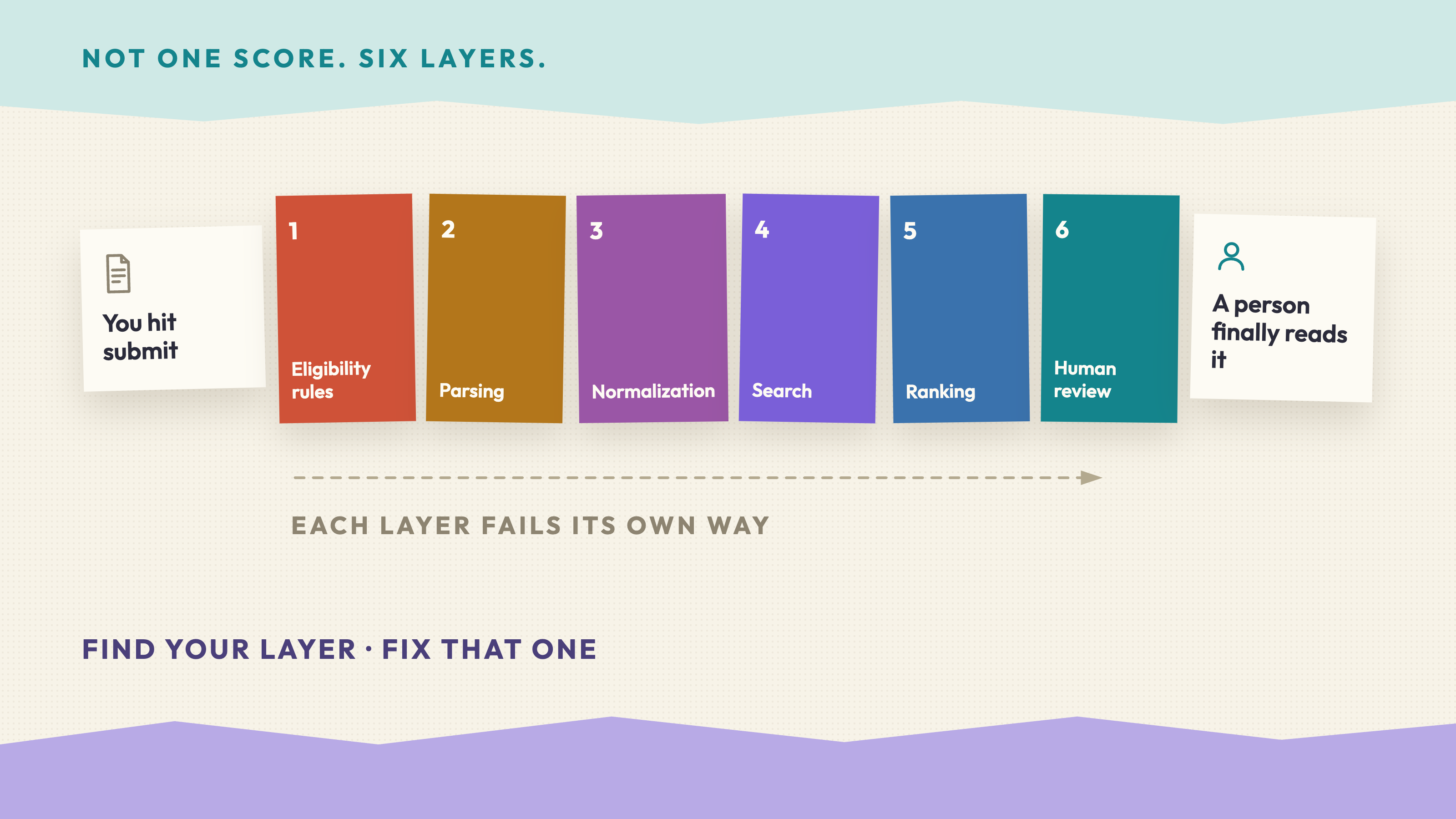
What actually happens is simpler. An ATS reads your file, pulls it apart into fields, and stores it so a recruiter can search and sort. If the parsing goes badly, your experience lands in the wrong place or disappears. If the parsing goes fine but the content is generic, a person reads it and moves on. You have to survive both steps, and the same document has to do it.
What Is an ATS?
An applicant tracking system is the software a company uses to receive, store, and manage applications. Workday, Greenhouse, Lever, iCIMS and Taleo are the ones you will meet most often.
Its main job is administrative. When you upload a resume, the system parses the file into structured fields — name, contact details, work history, education, skills — and saves them next to your application. Recruiters then search that database, filter it, leave notes, and move candidates between stages.
The most important thing to understand is that an ATS is a filing system, not a judge. It does not score your personality or decide you are unqualified. It makes your resume findable, and the quality of that filing determines whether a recruiter ever sees you.
How ATS Screening Actually Works
Three things happen between your upload and a human reading your resume.
Parsing. The system converts your file to text and assigns each chunk to a field. Standard section headings help enormously here, because the parser looks for words it recognises like "Experience" and "Education".
Searching. Recruiters query the database for the skills they need — "Python" and "SQL" for a data role, for example. Candidates whose resumes contain those terms come back in the results. This is where keywords genuinely matter, and it is a search, not an automatic rejection.
Ranking and filtering. Some systems score applicants against the job description, and some ask knockout questions such as work authorisation or years of experience. Those questions are usually answered in the application form, not read off your resume.
Nearly all real rejections are made by people. The mistake candidates make is assuming the machine is the gatekeeper, when the machine is mostly deciding whether a person can find you.
Choosing an ATS-Friendly Format
Format is where the avoidable damage happens. A parser reads a document top to bottom, left to right, so anything that breaks that flow risks being mangled.
Use a single-column layout. Two-column resumes look tidy to a human, but some parsers read straight across the page and interleave your job titles with your skills list.
Use standard headings: Experience, Education, Skills, Projects, Certifications. Creative alternatives like "Where I've Made an Impact" are the fastest way to make a parser miss an entire section.
Keep contact details in the body of the document, not in the header or footer, which some parsers ignore entirely.
Avoid text boxes, tables, columns, graphics, icons, logos and photos. Text inside a shape or an image is often invisible to the parser even though you can see it perfectly.
Use one standard font, real bullet characters, and consistent date formats such as Jan 2023 – Mar 2025. Never place information only in a graphic — a skills bar chart tells a parser nothing.
For the file itself, a .docx or a text-based PDF both parse reliably. What you must avoid is a scanned or exported-as-image PDF, because that contains no selectable text at all. There is a one-second test: open your PDF, try to select a line of text and copy it. If you cannot, neither can the ATS.
How to Use Keywords Naturally
Keyword stuffing fails for a simple reason. It gets you into the search results and then loses you the interview, because the person who opens your resume can see immediately that the words are not attached to anything real.
The approach that works is to put keywords inside evidence. Start from the job description and list the terms that appear more than once or sit in the requirements section. Those are the phrases the recruiter is most likely to search.
Then use the employer's own wording where it accurately describes something you have done. If the posting says "stakeholder management" and you would normally write "worked with other teams", adopt their phrasing — it is the same work described in the language the search will use.
Write the term into an accomplishment rather than listing it alone:
Weak:Skills: stakeholder management, SQL, dashboardsStronger:Partnered with three business teams to define reporting needs, then built SQL dashboards that cut weekly manual reporting by six hours.
The second version contains the same searchable terms and also proves them. Include both the spelled-out phrase and the acronym on first use, as in "search engine optimisation (SEO)", because different recruiters search for different forms.
What never works is a block of invisible white-text keywords or an unreadable list crammed into the footer. Recruiters convert resumes to plain text constantly, and this reads as a deception attempt the moment they do.
Where to Place Important Skills
Placement changes how quickly a reader believes you, and recruiters scan the top third of page one before deciding whether to continue.
Put your three or four most relevant capabilities in a short professional summary at the top, phrased as evidence rather than adjectives.
Put technical and tool keywords in a clean skills section, grouped by type, with no ratings or progress bars.
Put the same terms in your two or three most recent roles, attached to what you actually delivered with them. A skill that appears only in a list and never in your work history reads as aspirational.
For students and career changers, a projects section carries real weight. Treat each project like a job entry: what you built, which tools, what happened as a result.
Common ATS Resume Mistakes
- Submitting a scanned or image-based PDF containing no machine-readable text.
- Putting your name, phone and email only in the document header.
- Using a two-column template that interleaves sections when parsed.
- Renaming standard sections to something creative.
- Listing skills you cannot evidence anywhere in your experience.
- Writing duties instead of outcomes: "responsible for social media" tells a reader nothing about scope or result.
- Using a different job title from the one the industry uses, which makes you invisible in searches.
- Sending the identical resume to every posting.
The costliest error is the one that feels safest: a beautifully designed template downloaded from a design site. Those layouts are built to impress a human eye and frequently parse into unusable fragments.
ATS-Friendly Resume Checklist
Run this before every application. It takes about two minutes.
- Text is selectable in the PDF.
- Single-column layout, no text boxes or tables.
- Standard section headings.
- Contact details in the body, not the header.
- Consistent date format throughout.
- Job titles match the industry terms used in the posting.
- The top five requirements from the job description appear somewhere in your experience — truthfully.
- Every keyword is attached to a real accomplishment.
- No graphics, icons, ratings bars or photos carrying information.
- File named clearly, for example
Jane-Chen-Data-Analyst.pdf.
A useful final test: paste your resume into a plain-text editor. Whatever survives is roughly what the ATS sees. If the result is unreadable or out of order, fix the layout before you fix the wording.
Frequently Asked Questions
Do ATS systems automatically reject resumes?
Rarely. Most systems rank and organise rather than reject, and knockout rules usually come from application-form answers such as work authorisation. Almost all real rejections are made by a recruiter reading your resume.
Is PDF or Word better for an ATS?
Both parse well when the PDF is text-based. Follow whatever the application form asks for, and if there is no instruction, either is fine. The only genuinely unsafe file is a scan or an image export.
How many keywords should I include?
There is no target number. Cover the requirements that repeat in the job description and that you can genuinely support, then stop. Terms with no supporting evidence weaken the resume in front of a human.
Should my resume be one page?
One page for students and early-career candidates, two pages once you have several relevant roles. Length is a readability decision, not an ATS constraint.
Do ATS-friendly resumes have to look plain?
No. Clean typography, sensible spacing, bold job titles and clear hierarchy all parse fine. What causes trouble is structural decoration — columns, text boxes, tables and graphics — not visual quality.
Can I use the same resume for every application?
You can, but the match rate drops sharply. Keep one strong base version and adjust the summary, skills order, and the top bullets of your most recent role for each posting.
Put It Into Practice
An ATS-friendly resume is a formatting problem and an evidence problem at the same time, and the evidence half is the one that takes longer. Use Vibe ID™ to keep your projects, skills and measurable results in one place, so tailoring a resume to a new posting means choosing the right evidence rather than rewriting from a blank page.